How to Download Your Certificate
Follow the steps below to claim and download your event participation certificate from the vforv.org web site.
Step 1 — Visit the Website
Navigate to https://vforv.org and scroll down the page until you see the section labelled: “You Showed Up. Claim Your Certificate.” or click on https://vforv.org/get-your-certificate/

Step 2 — Click “Get Your Certificate”
Click the “Get Your Certificate” button. A list of available events will appear.
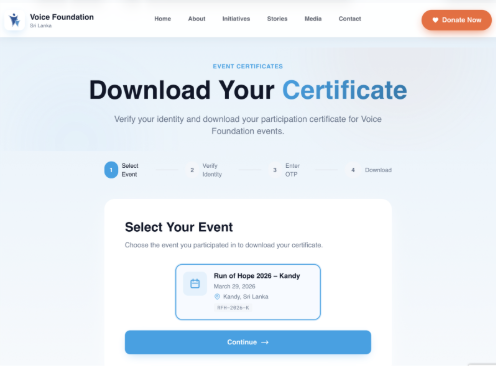
Step 3 — Select Your Event
Select your event from the list (e.g., “Run of Hope 2026 – Kandy”), then click the “Continue” button.
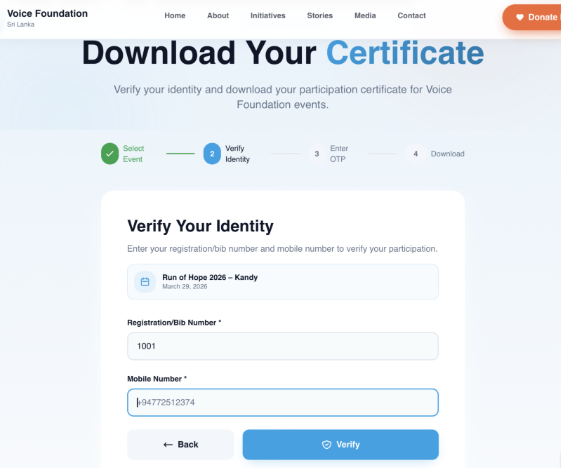
Step 4 — Enter Your Details
Enter your Bib Number and Mobile Phone Number in the fields provided, then click the “Verify” button.
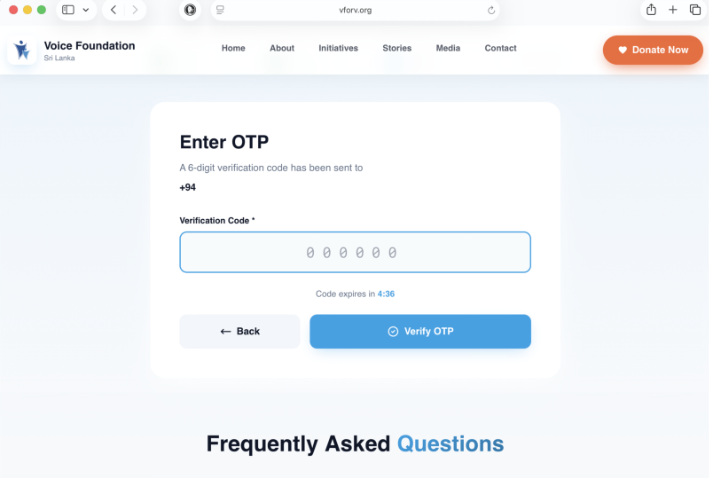
Step 5 — Verify via SMS
You will receive an SMS from VoiceFdnSL containing a one-time verification code. Enter this code in the field provided, then click “Verify OTP”.
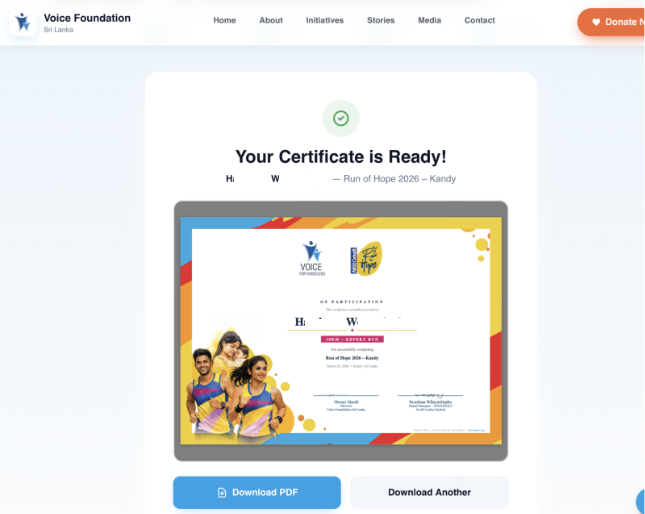
Step 6 — Download Your Certificate
Once verified, click the “Download PDF” button to save your certificate to your device.
If you experience any issues, please contact the event organizer or admin [at] vforv.org for assistance.